AuraPlex Harmony

Auracast Assistive Listening System

Bring the lesson to the room and to individual listeners. Three wireless speakers, headset and handheld microphones, and three personal receiver-and-earbud sets in one flexible bundle.

£549.99
Ask a Question

Checking the fastest delivery option…

Fast ShippingReliable Delivery
60-Day Free ReturnsHassle-Free
Bulk DiscountVolume Pricing Available
Free Setup SupportVenue Specialist Included
  • Room audio and personal listening in one bundle – broadcast to three Harmony A1 speakers and three AuraClip receiver-and-earbud sets.
  • Flexible speaker placement – position the three portable speakers around your small indoor space.
  • Two microphone styles included – choose the hands-free headset for teaching or the handheld microphone for presentations.
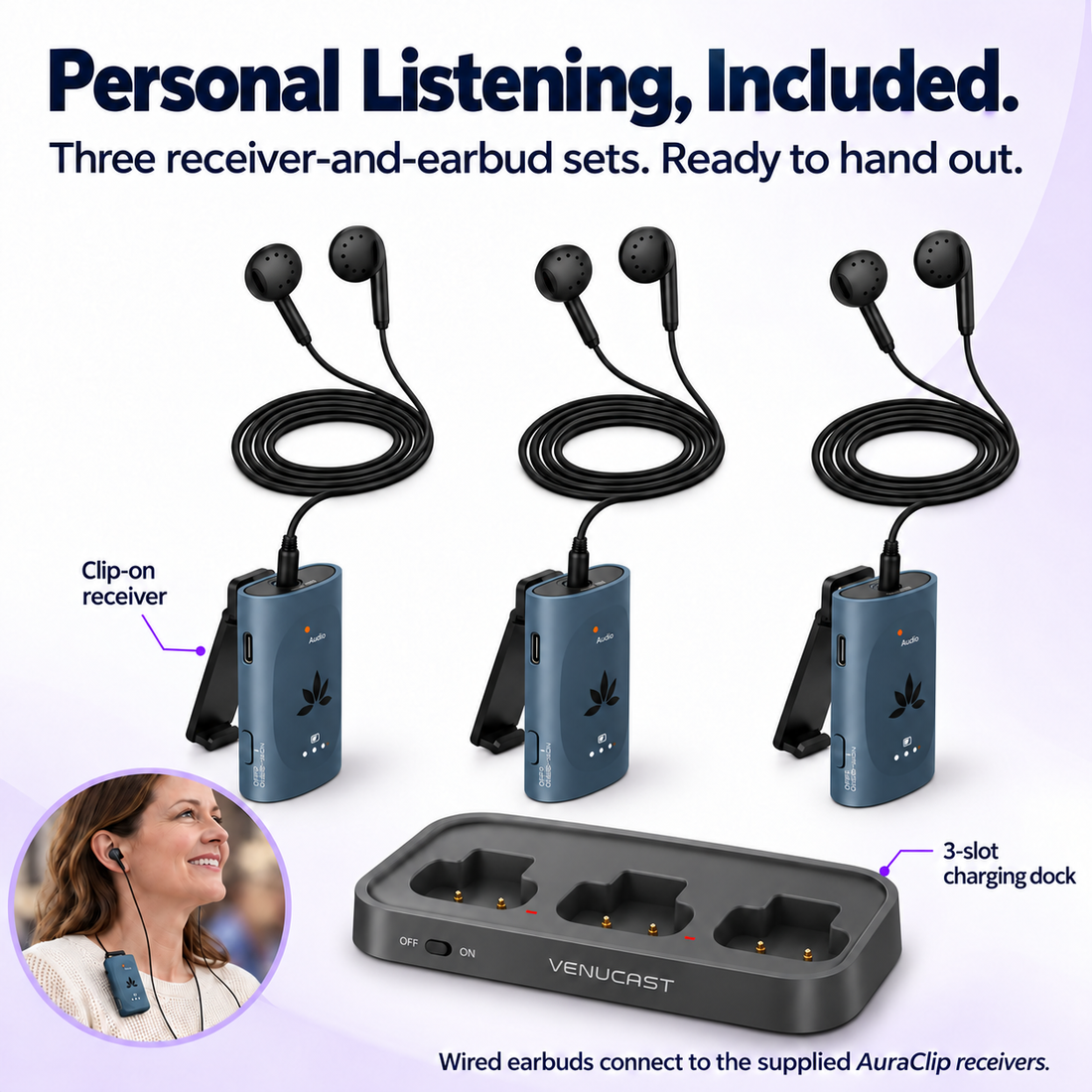
  • Personal volume control – each listener uses an AuraClip receiver with wired earbuds; the three-slot dock keeps receivers together between sessions.
  • Direct Auracast listening – compatible Auracast hearing aids can join the broadcast without a separate receiver.
  • Room to grow – add compatible Auracast speakers or personal receivers as your listening needs change.
AuraPlex Harmony £549.99

01 · Best for

Best For

Where AuraPlex Harmony fits

  • Classrooms & Learning Spaces setting Classrooms & Learning SpacesShare the teacher’s voice through three room speakers while students choose personal receivers with wired earbuds or compatible Auracast hearing aids. A hands-free headset keeps the teacher free to move.
  • Training & Workshops setting Training & WorkshopsKeep spoken instruction accessible during team training, workshops and demonstrations. Use the room speakers for the group and personal listening sets for participants who prefer their own volume.
  • Small Churches & Chapels setting Small Churches & ChapelsSupport spoken services, Bible study and small gatherings with room audio and personal listening choices. Worshippers with compatible Auracast hearing aids can listen directly; other guests can use the included receiver-and-earbud sets.
  • Community Rooms & Meetings setting Community Rooms & MeetingsBring flexible voice audio to clubs, community centres and small group meetings. Place speakers where the group needs them and offer three personal listening sets to guests who want an individual volume level.

Designed for classrooms, training rooms, small churches and chapels, and community meetings. Speaker placement, room acoustics and microphone position affect results; test your full setup in the intended space.

Before buying

Compatibility

Check the audio source and listening pathway for this kit.

A. Broadcast source

Audio sources

  • 3.5 mm AUX — connect the included FreeMic Duo microphone receiver
  • Optical audio — connect a compatible TV or audio source
  • Bluetooth audio input — stream from a compatible source device

B. Listening pathway

Listening pathways

Auracast hearing aids
Compatible Auracast hearing aids can join the same venue broadcast through their supported app or device controls.
Included AuraClip receivers
Connect the three included wired earbuds or other compatible 3.5mm headphones, earbuds or T-Coil neckloops.
Check Compatibility

Direct hearing-aid listening requires a hearing aid that specifically supports Auracast broadcast reception, with the required firmware and setup. Standard Bluetooth support alone is not sufficient. Hearing aids are not included. Listeners can also use the three included AuraClip receivers with wired earbuds.

Need help choosing AuraPlex Harmony for your venue? Find My Setup

02 · Product Details

Download Spec Sheet (PDF)

What's Included

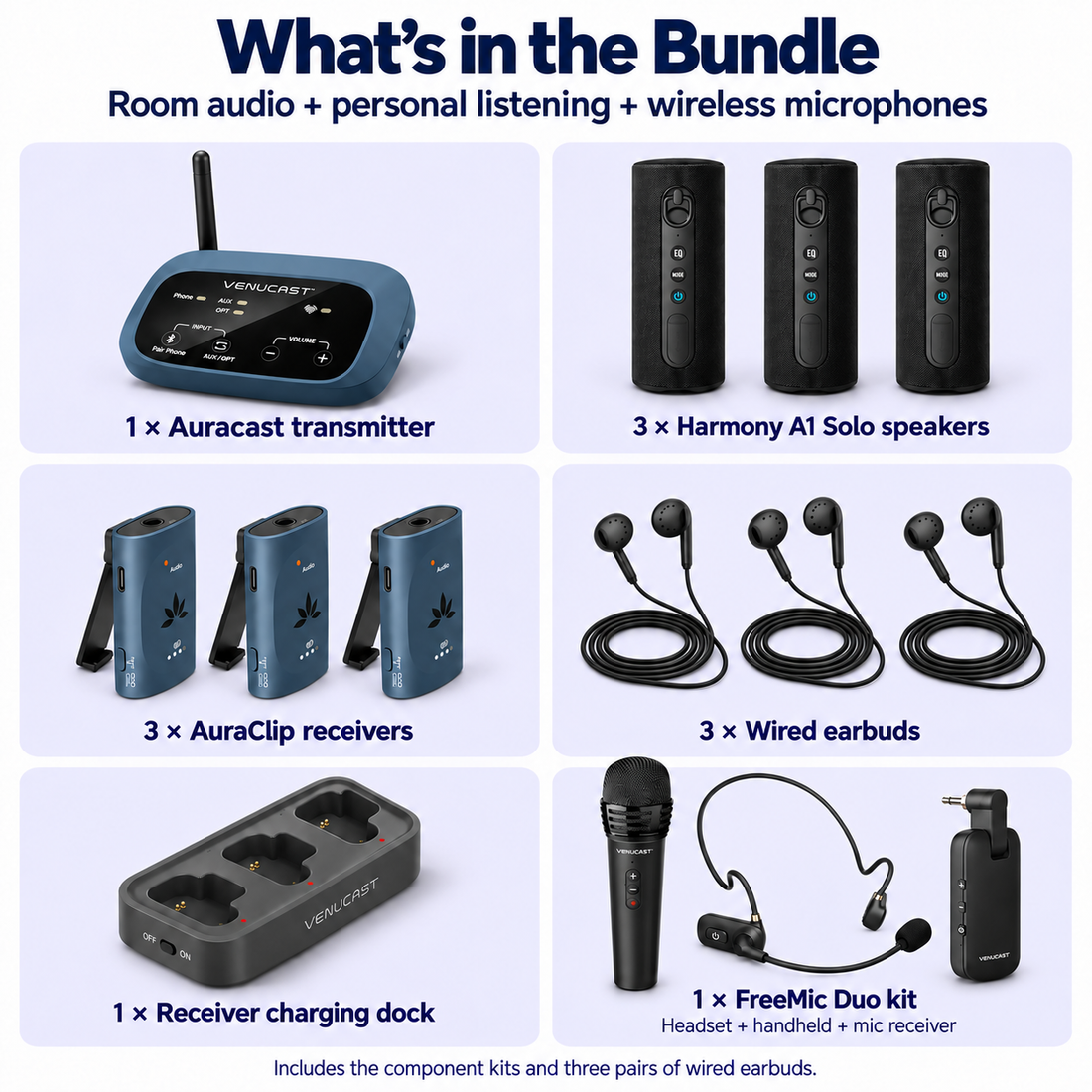
  • 1 × AuraPlex M3 Auracast transmitter
  • 3 × Harmony A1 Solo Auracast speakers
  • 3 × AuraClip personal receivers
  • 3 × Wired earbuds (1-Pack)
  • 1 × Three-slot receiver charging dock
  • 1 × FreeMic Duo headset microphone
  • 1 × FreeMic Duo handheld microphone
  • 1 × FreeMic Duo plug-in wireless microphone receiver

How It Works

Simple by design

Set up AuraPlex Harmony

Bring the lesson to the room and to individual listeners. Three wireless speakers, headset and handheld microphones, and three personal receiver-and-earbud sets in one flexible bundle.

  • Connect the microphone receiver
  • Join speakers and personal listeners
  • Set volume and check the room
1
Connect the microphone receiver Power the AuraPlex transmitter and connect the FreeMic Duo plug-in receiver to its 3.5 mm AUX input. Select AUX on the transmitter, then power on your chosen microphone.
2
Join speakers and personal listeners Put the three Harmony A1 speakers and three AuraClip receivers into Auracast reception mode and join the transmitter’s broadcast. Plug one pair of wired earbuds into each personal receiver. Compatible hearing-aid users join using their manufacturer’s Auracast setup process.
3
Set volume and check the room Start at low volume, position speakers away from the microphone and raise levels gradually. Walk through the room to check speech, wireless reception and feedback. Let each personal listener set a comfortable receiver volume.

03 · Setup & Config

Setup Downloads

Venue signage, listener materials, and hearing-aid connection guides.

View downloads

Troubleshooting

Get help with AuraPlex Harmony setup and operation.

Get help

Common Questions

AuraPlex Harmony FAQ

Will this work with my hearing aids?
Direct reception requires hearing aids that specifically support Auracast broadcast audio, with the appropriate firmware and setup. Bluetooth connectivity alone does not guarantee compatibility. Follow your hearing-aid manufacturer’s joining instructions. Hearing aids are not included.
Do listeners need a phone or their own hearing aids?
No phone or hearing aid is required to use the included personal listening sets. The bundle includes three AuraClip receivers and three pairs of wired earbuds. Each listener joins the broadcast with a receiver and adjusts their own volume.