AuraPlex M3

Auracast Assistive Listening System

AuraPlex M3 broadcasts clear venue audio to included AuraClip receivers and compatible Auracast hearing aids or headphones. It is designed for churches, classrooms, meeting spaces, and other small to mid-sized public venues.

£282.99
Ask a Question

Checking the fastest delivery option…

Fast ShippingReliable Delivery
60-Day Free ReturnsHassle-Free
Bulk DiscountVolume Pricing Available
Free Setup SupportVenue Specialist Included
  • Venue-Ready Group Listening – Complete Auracast assistive listening system with one transmitter, three receivers, and a charging dock. Easy to deploy with no specialized Auracast expertise required.
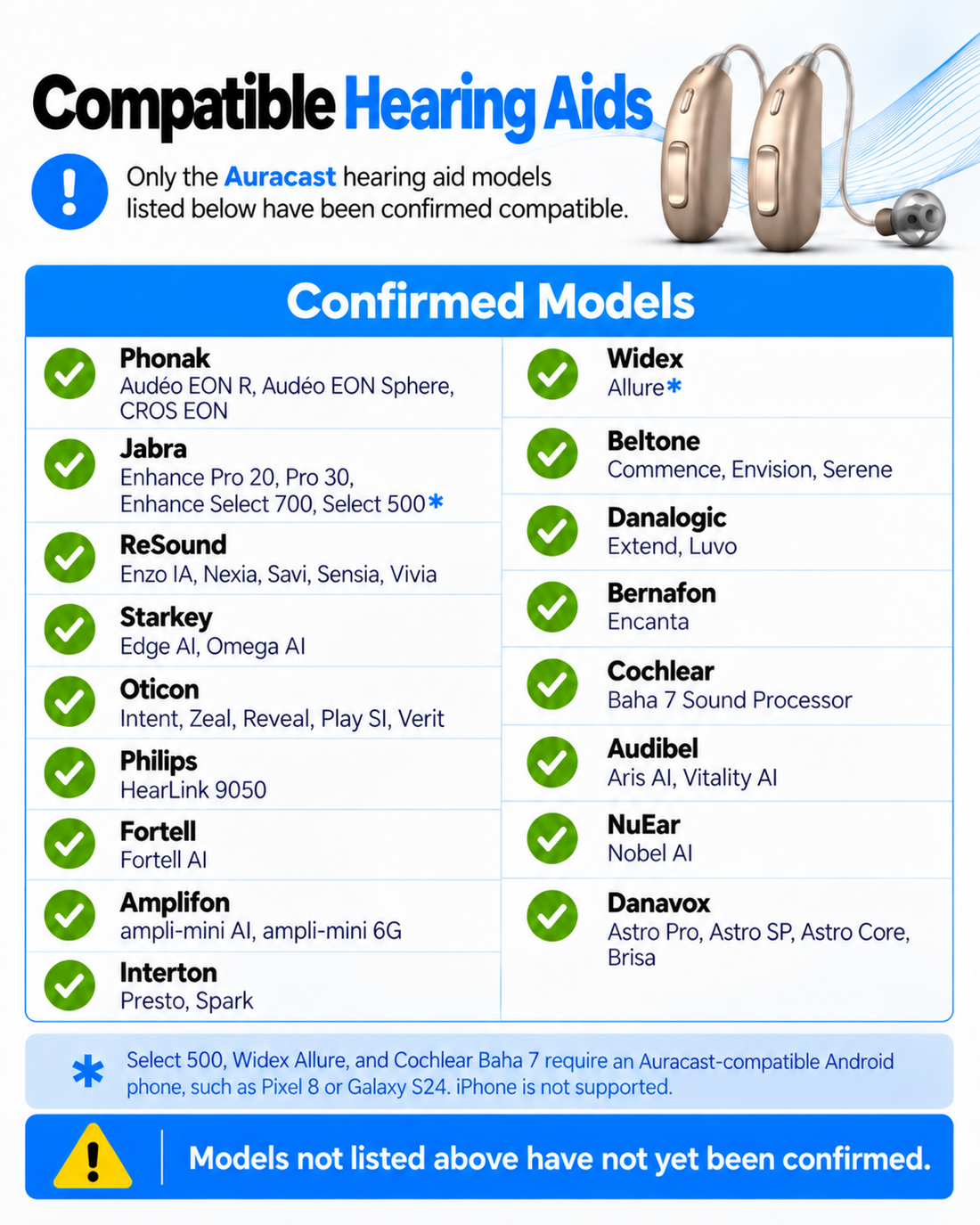
  • Auracast BYOD Support – Guests can use venue receivers or compatible Auracast hearing aids and headphones.
  • Long-Range Coverage – Up to 100m / 328ft line-of-sight receiver coverage for small to mid-sized venues.
  • Flexible Audio Inputs – Connect mixers, TVs, microphone systems, phones, or computers through AUX, Optical, or Bluetooth.
  • Scalable System – Expand beyond the included three receivers as venue listening needs grow.
  • Synchronized Listening – Approx. 60ms receiver sync latency supports clear shared speech and program audio.
AuraPlex M3 £282.99

01 · Best for

Best For

Where AuraPlex M3 fits

  • Church & Worship setting Church & WorshipBroadcast sermons, music, and announcements to venue receivers and compatible personal devices.
  • Classroom & Training setting Classroom & TrainingProvide synchronized speech and program audio for students and attendees.
  • Conference & Theater setting Conference & TheaterSupport clear shared listening for meetings, presentations, and public programs.
  • Community & Public Venue setting Community & Public VenueA scalable assistive listening system for community rooms and small to mid-sized venues.

Best suited to indoor small and mid-sized venues with clear line of sight. It is not intended for stadium-scale, outdoor, or ultra-low-latency applications.

Before buying

Compatibility

Check the audio source and listening pathway for this kit.

A. Broadcast source

Audio sources

  • Venue mixer or microphone system
  • TV or media player
  • Phone, tablet, or computer

B. Listening pathway

Listening pathways

Included AuraClip receivers
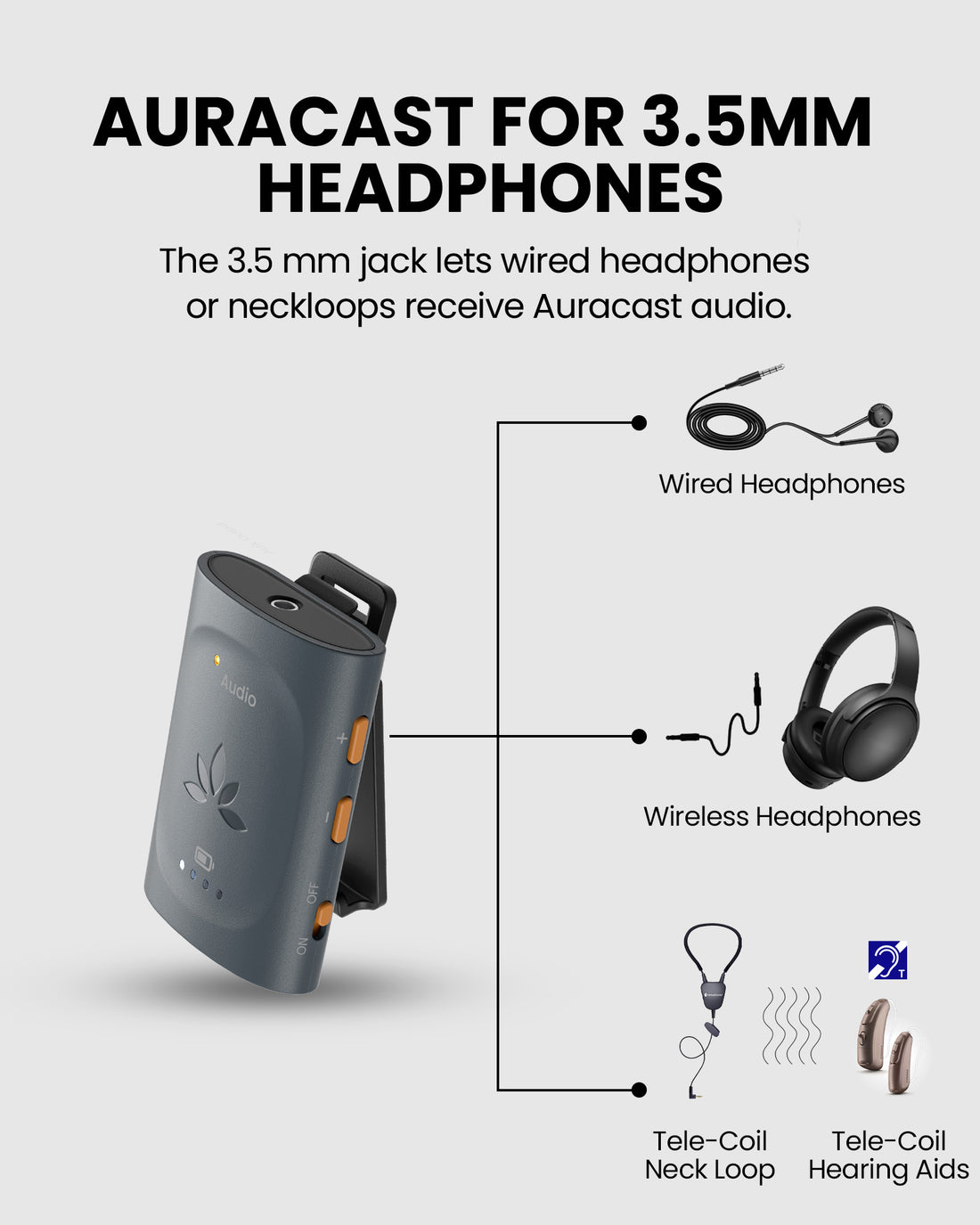
Guests connect wired 3.5mm headphones to the included venue receivers.
Auracast hearing aids
Compatible hearing aids can join the venue broadcast through their supported app or assistant.
Auracast headphones
Compatible personal Auracast headphones can join the same broadcast without venue-managed pairing.
Check Compatibility

AuraPlex M3 broadcasts one Auracast audio program to venue receivers and compatible personal Auracast devices. Device support depends on the listener device and its connection method.

Need help choosing AuraPlex M3 for your venue? Find My Setup

02 · Addons & Accessories

03 · Product Details

Download Spec Sheet (PDF)

What's Included

  • 1 x Oasis Aura transmitter
  • 3 x AuraClip receivers
  • 1 x 3-slot charging base
  • 1 x power adapter for charging base
  • 2 x USB-C data and power cables
  • 1 x 3.5mm audio cable
  • 1 x Optical audio cable
  • 1 x Dual 6.35mm to 3.5mm Audio Cable

How It Works

Simple by design

Set up AuraPlex M3

AuraPlex M3 broadcasts clear venue audio to included AuraClip receivers and compatible Auracast hearing aids or headphones. It is designed for churches, classrooms, meeting spaces, and other small to mid-sized public venues.

  • Connect the venue audio source
  • Start the Auracast broadcast
  • Join listeners
1
Connect the venue audio source Connect a mixer, TV, microphone system, phone, or computer through AUX, Optical, or Bluetooth.
2
Start the Auracast broadcast Power on the transmitter and confirm the broadcast name and audio level.
3
Join listeners Use the included AuraClip receivers or join with compatible Auracast hearing aids and headphones.

Technical Specifications

Wireless connectivity
Bluetooth 5.4 / Auracast
Latency
Approx. 60ms receiver sync latency
Audio inputs
Bluetooth, 3.5mm AUX, Optical
3.5 MM AUX INPUT
Approx. 10 kΩ input impedance; recommended input level ≤ 1 V
Recommended range
Receiver to transmitter: up to 100m / 328ft; phone or PC to transmitter: up to 10m / 33ft
Max expandability
Supports up to 100 venue receivers plus compatible Auracast personal devices
Transmitter codec
LC3
Transmitter dimensions
11.4 × 7.5 × 3 cm
Transmitter weight
90 g
Receiver playtime
Up to 16 hours
Receiver charging
Approx. 2 hours by USB-C; approx. 3.5 hours with charging base
Receiver dimensions
6.4 × 4.5 × 2.8 cm
Receiver weight
42 g
SKU
VHT-5403R
Package dimensions
30.6 × 22.6 × 5.7 cm
Packaged weight
831 g
Net weight
315 g

04 · Setup & Config

User Guide

Product-specific setup and operation instructions.

Open guide

Firmware & Configuration

Firmware releases and update instructions for the listed components.

Open PC tool

Setup Downloads

Venue signage, listener materials, and hearing-aid connection guides.

View downloads

Troubleshooting

Get help with AuraPlex M3 setup and operation.

Get help

Common Questions

AuraPlex M3 FAQ

What is AuraPlex M3 designed for?
AuraPlex M3 is a professional Auracast assistive listening system for churches, classrooms, meeting spaces, and other small to mid-sized venues.
How many people can listen at the same time?
The set includes three AuraClip receivers and can expand with more venue receivers. Compatible Auracast hearing aids and headphones can also join the broadcast.
What audio sources can connect to the transmitter?
The included transmitter accepts Optical, 3.5mm AUX, and Bluetooth audio from TVs, media players, phones, computers, mixers, and PA systems. Because mixer and PA outputs vary, use our Cable Finder to identify the correct connection for your equipment.Find the right cable for AuraPlex M3 →
Can guests use Auracast hearing aids?
Yes. Compatible Auracast hearing aids can join the venue broadcast through their supported hearing aid app or Android Auracast assistant.
Can visitors join by scanning a QR code?
Yes. A QR code can be generated for the Auracast broadcast. Visitors with compatible phones or hearing-aid apps can scan it to join. Venues can print and display the QR code at entrances or listening areas. Device and app support may vary.
See compatible devices and QR Code details →